
Data Types and Type Conversion
Last updated on 2026-10-11 | Edit this page
Estimated time: 30 minutes
Overview
Questions
- What kinds of data do programs store?
- How can I convert one type to another?
Objectives
- Explain key differences between integers and floating point numbers.
- Explain key differences between numbers and character strings.
- Use built-in functions to convert between integers, floating point numbers, and strings.
Every value has a type.
Every value in a program has a specific type.
We’re going to start with three basic data types in Python:
Use the built-in function type to find the type of a
value.
Use the built-in function type to find out what type a
value or variables has. Remember, the value has the type and
the variable is just a label.
OUTPUT
<class 'int'>OUTPUT
<class 'str'>Data types control what operations can be performed on a given value.
A value’s type determines what the program can do to it.
OUTPUT
2ERROR
---------------------------------------------------------------------------
TypeError                                 Traceback (most recent call last)
<ipython-input-2-67f5626a1e07> in <module>()
----> 1 print('hello' - 'h')

TypeError: unsupported operand type(s) for -: 'str' and 'str'
You can use the “+” and “*” operators on strings.
- “Adding” character strings concatenates them.
OUTPUT
Ahmed WalshMultiplying a character string by an integer N creates a new string that consists of that character string repeated N times because multiplication is repeated addition.
OUTPUT
==========Strings have a length (but numbers don’t).
The built-in function len counts the number of
characters in a string.
OUTPUT
3But numbers don’t have a length.
ERROR
---------------------------------------------------------------------------
TypeError                                 Traceback (most recent call last)
<ipython-input-3-f769e8e8097d> in <module>()
----> 1 print(len(52))

TypeError: object of type 'int' has no len()
You Must Convert Numbers to Strings and Vice-Versa to Use Them Together
You cannot add numbers and strings.
ERROR
---------------------------------------------------------------------------
TypeError                                 Traceback (most recent call last)
<ipython-input-4-fe4f54a023c6> in <module>()
----> 1 print(1 + '2')

TypeError: unsupported operand type(s) for +: 'int' and 'str'
This is not allowed because it’s ambiguous: should
1 + '2' be 3 or '12'?
Some types can be converted to other types by using the type name as a function.
OUTPUT
3
12
Can mix integers and floats freely in operations.
Integers and floating-point numbers can be mixed in arithmetic.
OUTPUT
half is 0.5
three squared is 9.0Automatic Type Conversion
What type of value is 3.25 + 4?
Use an index to get a character from a string.
- The characters (individual letters, numbers, and so on) in a string
are ordered. For example, the string
'AB'is not the same as'BA'. Because of this ordering, we can treat the string as a list of characters. - Each position in the string (first, second, etc.) is given a number. This number is called an index.
- Indices are numbered starting from 0.
- Use the position’s index in square brackets to get the character at that position.
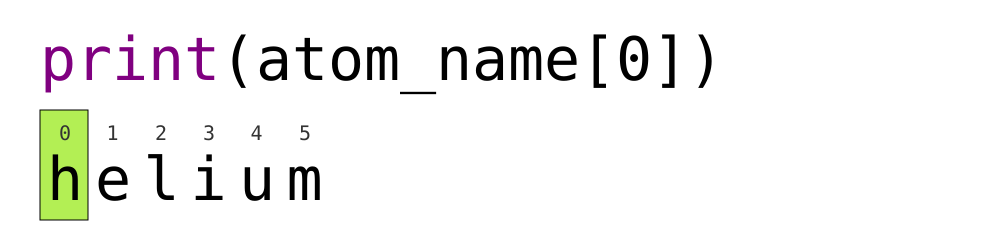
OUTPUT
hUse a slice to get a substring.
- A part of a string is called a substring. A substring can be as short as a single character.
- A slice is a part of a string (or, more generally, a part of any list-like thing).
- We take a slice with the notation
[start:stop], wherestartis the integer index of the first element we want andstopis the integer index of the element just after the last element we want. - Taking a slice does not change the contents of the original string. Slicing returns a copy of part of the original string.
OUTPUT
sodUse the built-in function len to find the length of a
string.
OUTPUT
6Nested functions are evaluated from the inside out, like in mathematics.
Challenge
If you assign a = 123, what happens if you try to get
the second digit of a via a[1]?
OUTPUT
atom_name[1:3] is: arVariables change when something is assigned to them
OUTPUT
first is 2 and second is 5- Python reads the value of
v1when doing the multiplication, creates a new value, and assigns it tov2. - Afterwards, the value of
v1is set to the new value and not dependent onvariable_oneso its value does not automatically change whenv2changes.
Fractions
What type of value is 3.4? How can you find out?
Choose a Type
What type of value (integer, floating point number, or character string) would you use to represent each of the following? Try to come up with more than one good answer for each problem. For example, in # 1, when would counting days with a floating point variable make more sense than using an integer?
- Number of days since the start of the year.
- Serial number of a piece of lab equipment.
- Current population of a city.
- Average height of a group of students.
The answers to the questions are:
- Integer, since the number of days would lie between 1 and 365.
- A string because a serial number typically contains letters and numbers.
- I would use an integer to represent population in units of individuals.
- Floating point number, since an average is likely to have a fractional part.
Division Types
In Python 3, the // operator performs integer
(whole-number) floor division, the / operator performs
floating-point division, and the % (or modulo)
operator calculates and returns the remainder from integer division:
OUTPUT
5 // 3: 1
5 / 3: 1.6666666666666667
5 % 3: 2
Decide between the division types above for the following questions, then compute the answers in Python.
- The number of whole weeks per year given 365 days per year and 7 days per week.
- The average number of people per park in Eugene, OR given 179000 people and 135 parks.
- The number of leftover hats given 12 hats distributed evenly among 10 volunteers.
- This requires floor division, because you don’t care about partial weeks.
- This requires float division, because you want to preserve the decimal in an average.
- This requires the remainder, because you want the number of hats remaining after one hat is given out per person.
PYTHON
weeks_per_year = 365 // 7
people_per_park = 179000 / 135
leftover_hats = 12 % 10

print(weeks_per_year, people_per_park, leftover_hats)
OUTPUT
52 1325.9259259259259 2Strings to Numbers
Where reasonable, float() will convert a string to a
floating point number, and int() will convert a floating
point number to an integer:
OUTPUT
string to float: 3.4
float to int: 3
If the conversion doesn’t make sense, however, an error message will occur.
ERROR
---------------------------------------------------------------------------
ValueError                                Traceback (most recent call last)
<ipython-input-5-df3b790bf0a2> in <module>
----> 1 print("string to float:", float("Hello world!"))

ValueError: could not convert string to float: 'Hello world!'
Given this information, what do you expect the following program to do?
What does it actually do?
Why do you think it does that?
What do you expect this program to do? It would not be unreasonable
to expect the int command to convert the string “3.4” to
3.4.
OUTPUT
---------------------------------------------------------------------------
ValueError                                Traceback (most recent call last)
<ipython-input-2-ec6729dfccdc> in <module>
----> 1 int("3.4")
ValueError: invalid literal for int() with base 10: '3.4'
However, Python throws an error. Why? To be consistent, possibly. If you ask Python to perform two consecutive typecasts, you must convert it explicitly in code.
OUTPUT
3Arithmetic with Different Types
Answer: 1 and 4
Slicing concepts
Given the following string:
What would these expressions return?
species_name[2:8]-
species_name[11:](without a value after the colon) -
species_name[:4](without a value before the colon) -
species_name[:](just a colon) species_name[11:-3]species_name[-5:-3]- What happens when you choose a
stopvalue which is out of range? (i.e., tryspecies_name[0:20]orspecies_name[:103])
-
species_name[2:8]returns the substring'acia b' -
species_name[11:]returns the substring'folia', from position 11 until the end -
species_name[:4]returns the substring'Acac', from the start up to but not including position 4 -
species_name[:]returns the entire string'Acacia buxifolia' -
species_name[11:-3]returns the substring'fo', from the 11th position to the third last position -
species_name[-5:-3]also returns the substring'fo', from the fifth last position to the third last - If a part of the slice is out of range, the operation does not fail.
species_name[0:20]gives the same result asspecies_name[0:], andspecies_name[:103]gives the same result asspecies_name[:]
Key Points
- Every value has a type.
- Use the built-in function
typeto find the type of a value. - Types control what operations can be done on values.
- Strings can be added and mulitiplied.
- Strings have a length (but numbers don’t).
- Use an index to get a single character from a string.
- Use a slice to get a substring.
- Use the built-in function
lento find the length of a string. - Must convert numbers to strings or vice versa when operating on them.
- Can mix integers and floats freely in operations.
- Variables only change value when something is assigned to them.